MyIRVING
Irving OilAuto & Vehicles
4.1261.00 Reviews
- Version
- 6.0.0
- Installs
- 100.00K
- Age Rating
- Everyone
Screenshots

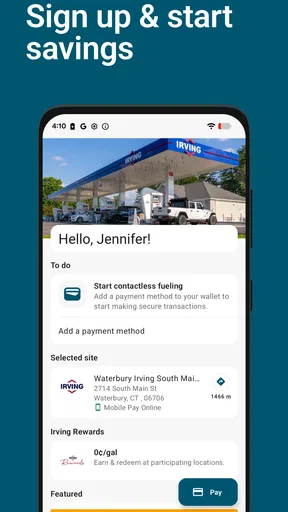
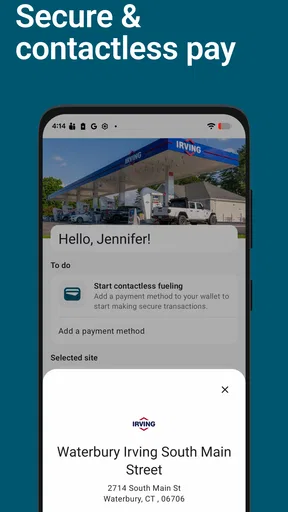
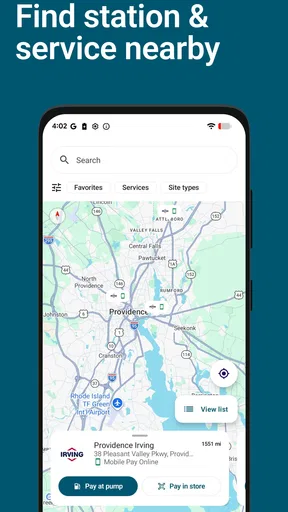
Our Review of MyIRVING
 Analysis by Appyee
When several people in a household use the same car, fuel stops can become an oddly easy thing to mishandle. One person fills the tank, another is driving later, and nobody remembers whether the family normally pays at the pump, inside the station, or through a separate loyalty routine. I found MyIRVING most useful in that everyday gap: it is an Auto & Vehicles app from Irving Oil that brings the company’s mobile experience into one place instead of leaving each driver to rely on memory or a paper receipt.
I would describe it as a practical companion for people who regularly visit Irving Oil locations, rather than a universal driving app. It is free, rated for Everyone, and has reached over one hundred thousand installs. That combination makes it easy to try, but the real question is whether Irving Oil is already part of your normal driving pattern. If it is not, the app has little reason to stay on your phone.
How MyIRVING fits into a shared household routine
My most convincing use case is a household with one vehicle and multiple drivers. Imagine a weekday morning when one person takes the car to work, a partner uses it for errands, and someone else needs to refuel before an evening trip. The app can serve as a common point of reference for the people who already deal with Irving Oil, helping the household keep its fuel routine tied to the same service rather than scattering information across unrelated apps, receipts, and notes.
That does not mean every member of the household should automatically use the same account. I would treat the app as a tool for individual account access first and household coordination second. Each driver should understand whose account is signed in, who is responsible for any payment or loyalty activity, and whether a particular action affects the person who owns that account. That simple boundary matters more than it might seem when a shared phone, family tablet, or vehicle console is involved.
For a couple sharing a car, the useful arrangement may be straightforward: one person manages the account while both drivers know when the app is being used. In a larger household, separate personal devices are safer from a privacy and accountability point of view. I would not hand a signed-in phone to a child or casual driver without first checking what the app exposes and what actions remain available from the active session.
The app’s value also depends on habit. If you only stop at Irving Oil occasionally, opening an app may feel like an extra step compared with paying in the usual way. If your household visits those stations often, keeping the app ready before leaving home can make the fuel stop less improvised. I prefer that approach: prepare while parked, then use the phone only when the vehicle is safely stopped.
What I would decide before installing it
The first decision is not technical. It is geographic and practical: do Irving Oil locations fit your routes? A driver who passes them on the way to work, school, or regular shopping has a clear reason to test MyIRVING. Someone who normally uses several unrelated fuel brands may be better served by a broader fuel-finding or expense-tracking tool, because a single-brand app will not organize the whole driving routine.
I would also ask who actually needs access. If one adult handles fuel and the other only drives, installing the app on both phones may create more confusion than convenience. If both adults independently refuel the car, separate use can make sense, but only after agreeing on account ownership and how shared expenses are handled. The app should support the household’s routine, not become another place where people wonder whose information they are viewing.
MyIRVING is available for devices running Android 8.0 or later, so owners of older phones should check compatibility before planning around it. On a current supported phone, I would install it while connected to a reliable network, open it before the first urgent fuel stop, and take time to understand the account flow. That first calm setup is important because a fuel station is a poor place to troubleshoot a forgotten password or an unfamiliar screen.
The current version is 6.0.0, and the app was released on January 20, 2020. I see that history as a reason to judge it by present usefulness rather than by the age of the original release. An app can remain worthwhile after several years if its current experience fits the job, but I would still keep expectations realistic: this is a focused Irving Oil tool, not a complete replacement for every driving service.
Account boundaries matter more than shared convenience
One of the easiest mistakes with any vehicle-related app is treating a shared device as if it were a shared identity. I would avoid leaving a personal session open on a phone that other household members regularly borrow. Even when everyone trusts one another, accidental use of the wrong account can make later records or transactions harder to interpret. A quick sign-out or a clear agreement about the active account prevents that kind of avoidable friction.
I also would not create an account for a child simply because the child sometimes rides along or helps with errands. The Everyone age rating makes the app broadly suitable from a content perspective, but that is not the same as giving every family member financial or account responsibility. An adult should decide who is authorized to use the account, who can make decisions at the station, and who reviews the resulting activity.
This is especially relevant when a teenager begins driving the family car. The app may be useful as part of a supervised fuel routine, but it should not replace a conversation about safe phone use, payment responsibility, or what to do if the app does not work. I would set the expectation that the driver parks safely before handling the phone and uses the ordinary station process if the digital route becomes confusing.
Shared use also raises a quieter issue: notification and visibility. If more than one person can see the device, the account holder should be comfortable with whatever information appears during normal use. I would keep the app on the device of the person who manages the account unless there is a strong reason to do otherwise. That is not a criticism of MyIRVING specifically; it is simply a sensible boundary for any app connected to vehicle spending or personal account details.
Coordinating fuel stops without turning the app into a family dashboard
MyIRVING works best when the household gives it a narrow, clear role. I would use it to support the fuel stop itself, while keeping broader household budgeting in a separate system. A shared note, banking app, or spreadsheet may still be better for recording who paid, how a work trip should be reimbursed, or how much the car costs each month. Trying to make one branded fuel app serve as a full family expense manager is likely to create unnecessary work.
A useful routine is to agree on a simple trigger: the driver who notices the fuel level is low tells the next driver, and the person who is already passing an Irving Oil station handles the stop. The app then becomes the preparation tool rather than the communication channel. This division is helpful because it avoids assuming that every household member must monitor the same account or receive the same information.
For a shared work vehicle, I would be even more careful. If several employees use the same car, one personal account may not be appropriate for everyone. The person responsible for the vehicle should establish the approved process, and drivers should know when a normal payment method is required instead. MyIRVING can be convenient for an individual driver, but workplace accountability usually needs a procedure that is visible to the organization rather than tied to one employee’s phone.
Another practical tip is to keep a backup plan. Before relying on the app during a time-sensitive trip, I would make sure the driver knows how to complete the fuel stop without it. A phone can be out of battery, a connection can be unreliable, or an account can require attention at the wrong moment. The app should reduce friction when it works, not become a single point of failure for getting back on the road.
What the app does well for regular Irving Oil customers
The strongest part of MyIRVING is its focus. Instead of asking a regular Irving Oil customer to piece together a routine from general navigation, payment, and note-taking tools, it gives that customer a dedicated place to start. I like focused apps when the brand relationship is already established, because the narrower scope can make repeated tasks easier to remember.
That focus is also why I would recommend it selectively. A driver who wants one app to compare every fuel provider, plan long road trips, monitor vehicle maintenance, and track mileage will probably find MyIRVING too limited as a primary driving tool. A navigation app remains better for route planning, a maintenance log remains better for service records, and a budgeting app remains better for household cost analysis. MyIRVING should complement those tools, not pretend to replace them.
The store rating sits at about 4.1 from over five hundred ratings, with more than two hundred written reviews. I read that as a sign of useful everyday appeal rather than proof that every driver will have a smooth experience. Ratings can tell me that the app has found an audience, but they do not remove the need to test the sign-in process, account boundaries, and station routine on my own phone.
I also appreciate that the app is free to download. That lowers the risk of trying it for a week or two and deciding whether it genuinely saves effort. Free does not automatically mean effortless, though. The real cost is attention: learning where the relevant options are, keeping the account organized, and remembering to use the app at the right point in the fuel-stop routine.
Where the experience can become inconvenient
The biggest limitation is the brand boundary. If your household chooses fuel stations based on price, location, opening hours, or whichever route happens to be busiest, a single-provider app may be useful only occasionally. In that situation, a general navigation app can be more valuable because it helps with the whole journey rather than one company’s station network.
There is also a human-factors problem. The person who installs the app is not always the person who drives the most. If one household member sets everything up and another is expected to use it under pressure, the second person may feel the app is an obstacle rather than a convenience. I would solve that by walking through the process together while parked, not by sending instructions in a message five minutes before a departure.
Account sharing can create similar friction. A common login may appear convenient, but it blurs responsibility and can make personal information visible on a shared device. I would rather have clear individual boundaries than a single account that everyone uses casually. If the household cannot agree on that arrangement, the ordinary station process may be the better choice.
Finally, no app should encourage phone handling while driving or while standing in a rushed queue. MyIRVING belongs in the preparation and parked portions of the trip. If the screen is unclear, the phone is unavailable, or another driver is waiting, I would finish the stop using the standard method and investigate the app later. Convenience is not worth unsafe attention or a delayed departure.
Who should use it, and who should skip it
I would recommend MyIRVING to a regular Irving Oil customer who wants a dedicated mobile companion for fuel stops and is comfortable keeping account access personal. It is particularly sensible for an adult who drives frequently, follows repeat routes, and wants the same process available without relying on a paper receipt or a remembered web address. The free price makes experimentation easy, and the Everyone rating means families can consider it within a general household technology setup, while still keeping adult control over account use.
I would be more cautious for a household with many drivers and no agreement about shared access. The app may still work for the account holder, but it will not solve the underlying coordination problem by itself. I would also skip it if Irving Oil is rarely used, if the device is too old for the required operating system, or if your main need is nationwide station comparison rather than a brand-specific experience.
For someone who drives for work, the decision depends on reimbursement and record-keeping. If the employer has a required payment or receipt process, follow that first. A personal fuel app should not replace company rules. For a new driver, the app can be introduced as part of a supervised routine, but learning safe fueling and responsible phone use should come before learning any convenience feature.
My household verdict after weighing convenience and control
MyIRVING makes the most sense as a focused tool for people who already choose Irving Oil and want a more organized mobile routine. I would not install it simply because it is an Auto & Vehicles app; I would install it because the brand appears repeatedly in my real routes. That distinction keeps the app useful instead of letting it become another rarely opened icon.
For shared households, my recommendation is to define the boundaries first: choose the account holder, decide which adults need access, agree on how fuel expenses are discussed, and keep a conventional backup method available. Those steps make the app easier to live with because they prevent a convenience feature from becoming a source of uncertainty.
After considering its focused purpose, free access, broad age rating, and current audience, I see MyIRVING as a reasonable try rather than an essential download for every driver. Its best feature is the fit between a familiar Irving Oil routine and a dedicated mobile tool; its main weakness is that the same narrow focus limits its value outside that routine. If your household regularly stops at Irving Oil, I think it is worth testing on one responsible adult’s phone first. If your needs extend across many fuel brands or require detailed family expense management, a broader alternative will probably serve you better.
Verdict
Strengths of MyIRVING
- Quickly checks account balances, transactions, and payment details.
- Convenient access to Irving fuel and convenience-store information.
- Mobile access reduces the need to visit a service desk.
- Useful for managing loyalty benefits while traveling or on the go.
- Simple interface makes essential account tools easy to find.
Limitations of MyIRVING
- Some features may require an eligible Irving account or membership.
- App usefulness depends on Irving locations and services in your area.
- Transaction or balance updates may not appear immediately.
- Requires internet access for most account and location features.
- Availability of certain features can vary by region or account type.
Similar Picks in This Category
View All
Android Auto
Google LLC4.1

maxim — order a taxi & food
PT. SITO4.7

Штрафы ГИБДД: проверка с фото
Pays LLC – Штрафы ГИБДД4.7

Номерограм – проверка авто
Авто Ассист4.8

Дром Авто
Дром4.9

Frequently Asked Questions
What is MyIRVING and what can I use it for?
MyIRVING is the official mobile app for Irving Oil customers, designed to make everyday fuel and convenience-store visits easier. Depending on your location and account eligibility, you can use it to find nearby Irving locations, view fuel prices, manage rewards or loyalty benefits, access promotions, and review account-related information. Available features may vary by region and may require registration.
Is MyIRVING free to download and use?
Yes, MyIRVING is generally free to download from the official Google Play Store or Apple App Store. However, using certain features may involve normal costs connected with fuel purchases, merchandise, mobile data, or your payment provider. The app itself should not require a subscription, but promotions, rewards, and account services can depend on the terms applicable to your location.
Do I need an account to use MyIRVING?
Some basic features, such as browsing participating locations or checking general information, may be available without signing in. To receive personalized offers, manage loyalty benefits, track activity, or use account-specific services, you will usually need to create or access an Irving Oil account. Registration may require an email address, password, and additional information for verification.
Does MyIRVING support rewards, promotions, or mobile payments?
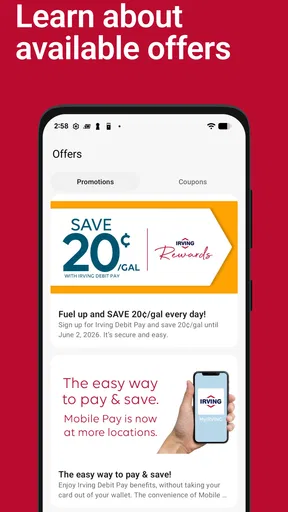
MyIRVING may provide access to Irving Oil rewards programs, personalized offers, digital coupons, or payment-related features, depending on the country, participating locations, and current program rules. Not every station or promotion necessarily supports every feature. Before relying on the app at checkout or at the pump, check the displayed terms and confirm that the location participates.
What permissions and personal information does MyIRVING require?
MyIRVING may request access to location services so it can show nearby Irving stations, directions, fuel prices, or location-based offers. It can also process account details, purchase or rewards activity, and device information needed to operate the service. You can review permissions in your phone settings and should read the app’s current privacy policy before creating an account.
